
Browser softphoneEverything a desk phone does — in a browser tab.
When a human needs to make or take the call, TalkerIQ's softphone gives your team hold, warm and cold transfer, call merge, recording controls, wrap-up notes and instant contact lookup — with no hardware and nothing to install.
One number, every device
What is a softphone?
A softphone is a phone that runs as software — in TalkerIQ's case, in your web browser — so your team can make and receive calls from a laptop and headset instead of a desk phone. TalkerIQ's softphone adds professional call handling and shares contacts, history and CRM sync with your AI agents.
- Runs in
- Chrome, Edge, Safari, Firefox + desktop app
- Hardware
- None — laptop and headset
- In-call tools
- Hold, mute, warm/cold transfer, merge, record
- Context
- Caller record and history as it rings
- After the call
- Wrap-up notes and dispositions, logged to CRM
- Plans
- Included in every plan from $29/user/mo billed annually
Sound familiar?
Our desk phones, our CRM and our AI tool were three different screens — and none of them knew what the others were doing.
Hardware that only works at the office
Desk phones and a PBX to maintain, and nothing for hybrid teams.
Calling blind
Reps pick up without knowing who's calling or what happened last time.
"I'll log it later"
Outcomes get typed up at 6 PM — or never.
How it works
How does a softphone call work, start to finish?
It rings in the browser
With the caller's name and history already on screen thanks to contact lookup.
AutomaticHandle it like a pro
Hold, mute, warm or cold transfer, merge into a three-way call.
Your teamProtect sensitive moments
Pause recording while card details are read out, then resume.
Your teamWrap up in seconds
Structured wrap-up notes attach to the contact; the AI adds a summary.
Your team + AI
In the call
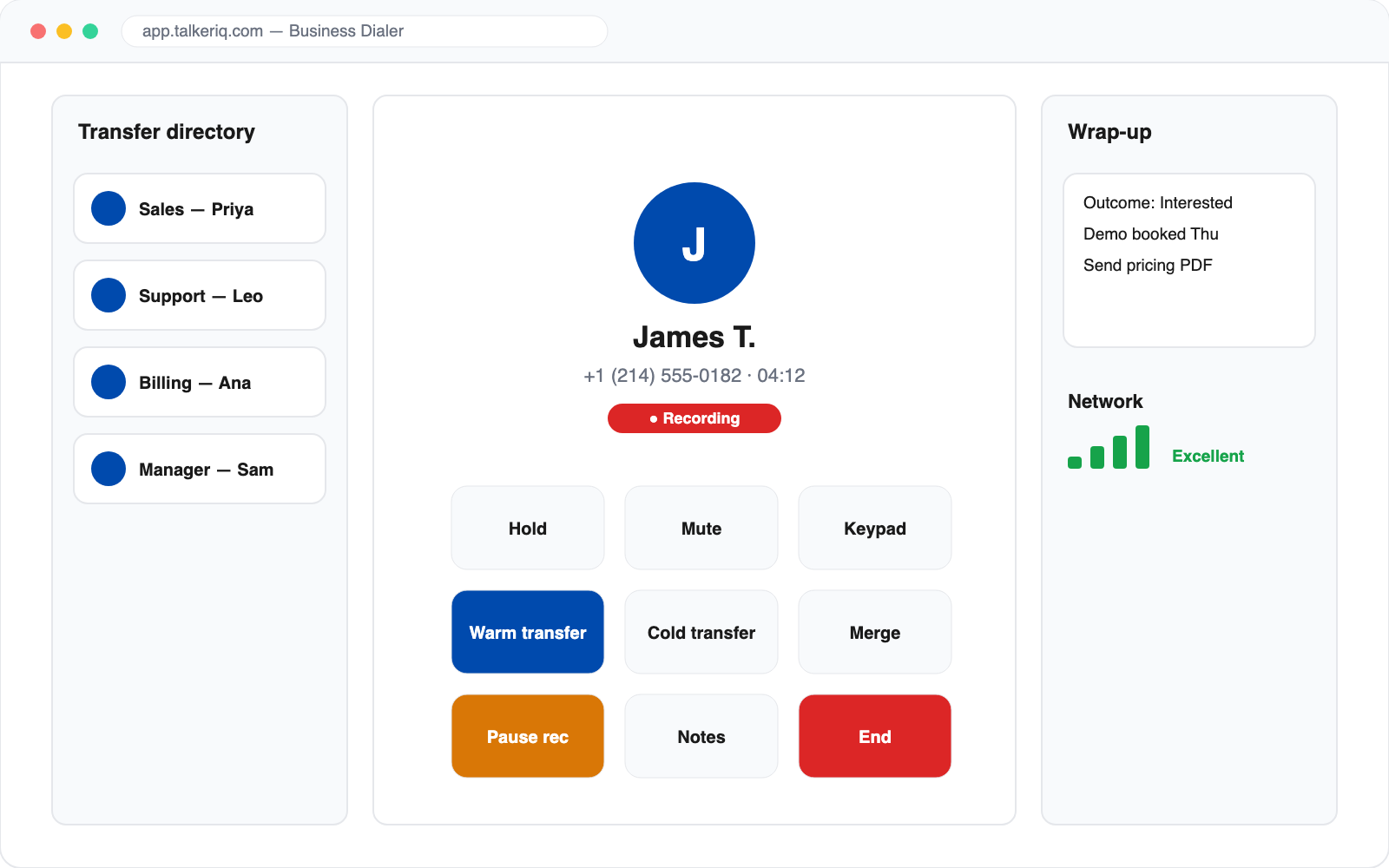
One in-call screen for every move.
Put callers on hold, run warm or cold transfers through a managed transfer directory, and merge calls into a conference — without switching windows.
- Hold, transfer and merge from one screen
- Recording pause and resume for compliance
- Network quality indicator and audio device settings
Beside your AI
Your AI qualifies. Your softphone closes.
Human calls and AI calls share the same contacts, history, recordings and CRM sync. An AI agent can warm-transfer a hot lead straight to a teammate on the softphone, with a context card.
- One call history for humans and AI
- Warm handoff from AI with context
- Local presence for outbound calls
AI qualifies · your team closes
- Name
- Priya N.
- Need
- 40 seats
- When
- Next month
- Score
- Hot
What changes
What changes when the phone lives in the browser.
hardware
Any laptop and headset is a fully featured business phone.
before hello
Caller details and history on screen as it rings.
every call
Recordings, wrap-up notes and outcomes in one history.
The details
What can you do on the TalkerIQ softphone?
Inbound & outbound
Make and receive calls on your business numbers from the browser.
Warm & cold transfer
Through a transfer directory your team manages in TalkerIQ.
Call merge
Turn a call into a three-way conversation.
Recording controls
One-click recording with pause and resume.
Wrap-up notes
Structured notes that attach to the contact's history.
Call quality
Live network-quality indicator and audio device settings.
A day with TalkerIQ
A sales rep's morning, all from one browser tab.
James works from home two days a week. No desk phone, no extra app.
- Logs in and goes available
His business line, voicemail and texts are in the same tab as the CRM integration.
- Inbound call with context
The softphone shows the caller's open deal and last call before he answers.
- Brings in a specialist
Puts the customer on hold and uses call merge to add a solutions engineer.
- Pauses recording for payment
Recording pauses while the card is read out, then resumes.
- Switches to the power dialer
Works his follow-up list with the power dialer from the same screen.
Compare
Softphone vs desk phone — what's the difference?
| Desk phone + PBX | TalkerIQ softphone | |
|---|---|---|
| Works from home or on the road | No | Yes |
| Upfront hardware | Phones + PBX | None |
| Caller context on screen | Rarely | Yes, from your CRM |
| Recording + AI summary | Add-on, if at all | Built in |
| Same history as AI calls | No | Yes |
FAQ
Questions about the softphone
Still unsure? Talk to our team.
Reviewed by the TalkerIQ product team · Updated
Do I need any hardware or software?
No. It runs in a modern web browser with your computer's microphone and speakers or a headset. Desktop and mobile apps are also available.
Can I transfer a live call to a colleague?
Yes — warm transfers (speak to your colleague first, then connect) and cold transfers (direct handoff), using a transfer directory your team manages inside TalkerIQ.
Can I pause recording during sensitive information?
Yes. Recording can be paused and resumed mid-call — useful when callers share payment card details.
Does the softphone handle inbound calls too?
Yes. Inbound numbers can route to the softphone, with contact lookup showing who's calling. Teams often combine this with AI agents answering first and escalating to humans.
Are human calls logged the same way as AI calls?
Yes. Recordings, wrap-up notes and outcomes join the same call history and CRM sync as AI-handled calls.
Is a softphone as reliable as a desk phone?
On a stable internet connection, yes. TalkerIQ's softphone shows a live network-quality indicator, and calls can also ring on the mobile app as a backup if your connection drops.
What headset should I use with a softphone?
Any USB or Bluetooth headset with a microphone works. A wired USB headset with noise cancellation usually gives the clearest audio for all-day calling.
Keep exploring
Replace the desk phone today.
Book a walkthrough and make your first call from the browser in minutes.